
Developer tools
EffCSS stylesheets and associated makers can be inspected via the special browser extension - EffCSS Developer Tools.
Installation
The installation method depends on the browser:
- Mozilla Firefox can use the extension from the own addons store,
- Chromium based browsers (such as Google Chrome, Yandex Browser, Microsoft Edge etc.) can install the extension manually from zip archive using chrome://extensions.
Interface
The extension allows to inspect stylesheets created via EffCSS. You can use sorting, filter by active state, search for CSS content and inspect concrete config - both maker and stylesheet.
Workspace consists of two parts - list and card areas.
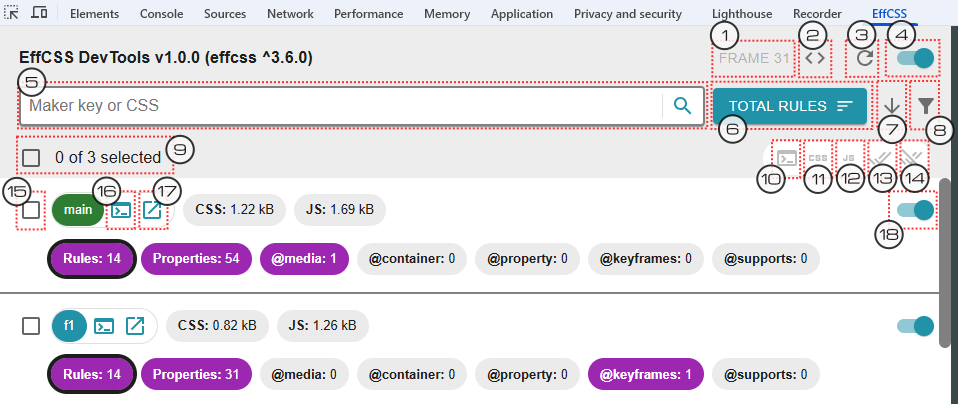
The list area provides the following actions:
- Select inspected frame (if there are several frames with EffCSS).
- Display current frame style provider in the browser console.
- Reload extension.
- Switch on/off all EffCSS stylesheet for current frame.
- Search for CSS content or maker key.
- Select sorting property.
- Select sorting direction.
- Filter active/passive stylesheets.
- Select all stylesheets or reset selection.
- Display selected stylesheets in the browser console.
- Save CSS from selected stylesheets.
- Save JS from selected stylesheets makers.
- Switch on selected stylesheets.
- Switch off selected stylesheets.
- Add stylesheet to selection or delete from.
- Display stylesheet in the browser console.
- Open stylesheet card.
- Switch on/off stylesheet.
The list area also allows to compare stylesheets using several counters such as rules, properties, etc. To see CSS content or related maker you need to open stylesheet card.
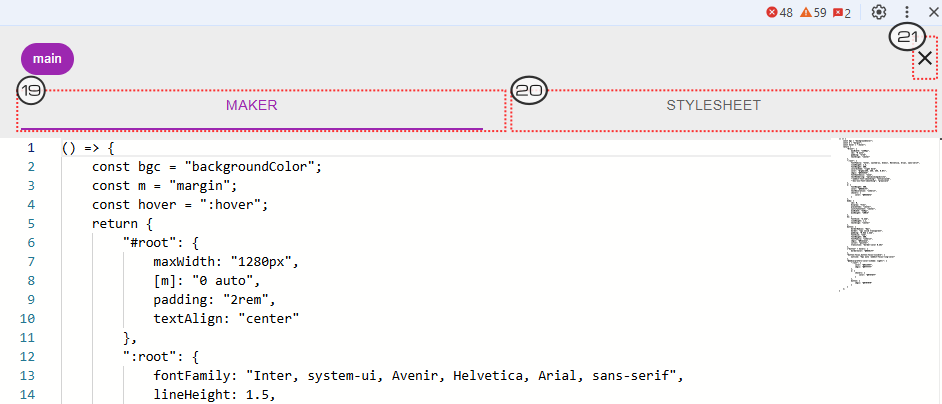
The card area provides the following actions:
- Open maker tab.
- Open stylesheet tab.
- Close card.